 Education Quest
Exam practice your child will actually want to do
Education Quest turns 7+, 8+, 11+ and SATs preparation into an adventure. Children travel a map of worlds, beat boss battles and earn stars. Behind the fun is real exam-style practice in maths, English, verbal reasoning and non-verbal reasoning, and now step-by-step lessons for the Year 6 SATs.
7 days free, then £9.99 a month for the whole family. Cancel any time.


Or play in your web browser on any computer, laptop or tablet. Add a card when you sign up; cancel before the 7 days end and you pay nothing.
- No adverts
- Parent area behind a PIN
- Up to 4 children on one plan
Made for real family life
Ten minutes at the kitchen table, a cheer on the sofa, and a quick look together at how it's going.


See it in action
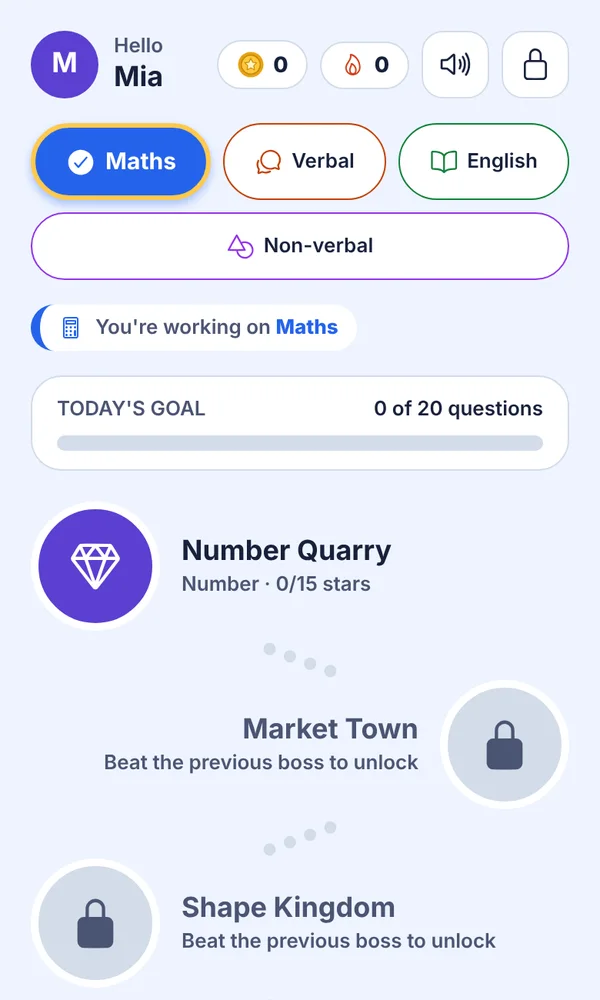
37 seconds of the real app: the quest map, Pip showing a worked example step by step, coins for a right answer, a picture-puzzle lesson and the levels for each school year.
- Maths, English, verbal and non-verbal reasoning
- Every question read aloud, word by word, with a Repeat button to hear it again
- Mistakes explained, then another go
- SEND and dyslexia friendly
More videos on our YouTube channel.
Every subject in the exams
Questions are made fresh every time in the style of the real tests, so children never run out and can't just remember the answers.
Maths
Number, fractions, money, shape, data, problem solving and timed mental maths.
English
Comprehension, spelling, grammar, punctuation and vocabulary, plus a writing desk for the 7+, 8+ and 11+.
Verbal reasoning
Letter codes, hidden words, analogies, word links, number series and more.
Non-verbal reasoning
Patterns, codes, grids, reflections, folding, cubes, 3D views and hidden shapes.
KS2 SATs, taught like a lesson
For Year 6, Education Quest doesn't just quiz. Pip teaches each topic, in line with the national curriculum, then your child practises it.
1. Explain
Pip explains the idea in plain words, with the key part highlighted.
2. Watch me
A worked example, one step at a time.
3. Together
Your child does one with Pip, with a hint if they get stuck.
4. Your turn
A few questions on their own, typing answers just as on the real paper.
5. Recap
The key points are saved to a notebook to look back on before the test.
SATs papers
Timed arithmetic, reasoning, reading, grammar and spelling papers, with an estimated scaled score.
59 lessons across maths, reading, and grammar, punctuation and spelling, 10 original reading texts, and practice papers for every SATs test: arithmetic, both reasoning papers, reading, grammar and spelling.
Learning that feels like a game
- A map of worlds to explore. Each world teaches one skill. Beat its boss battle to open the next.
- Pip, a friendly talking guide, greets your child by name, cheers streaks and suggests a break when it's time.
- Every mistake is explained step by step (tap Repeat to hear it again), then your child tries a similar question so it sticks.
- Repeat a round straight from the results page, to try for a better score.
- Every topic has a full lesson. Pip explains it, shows a worked example, does one with your child, then they have a go. Pip offers it again if they get stuck.
- Timed mock papers in the style of the real exams, section by section, so test day feels familiar.
- Answer by voice: children can say their answer instead of tapping.

You'll know exactly how they're doing
The parent area is protected by your PIN. Inside you'll find:
- Progress by subject and topic, best mock scores and the mistakes made most often.
- Weekly progress emails with charts, a national curriculum guide for their school year and what to practise next.
- Results emails after mock papers and boss battles, if you'd like them.
- Reminders on your child's device for daily practice and keeping their streak going.
- Your own settings: the voice, timers, how lessons work and what happens after a wrong answer.

Built for every kind of learner
In the parent area, choose any areas where your child needs support and the app suggests adjustments. You can switch each one on or off, and the needs you choose stay private on your child's device.
Read aloud and repeat
A Repeat button on every question, and on every explanation, so your child can hear it as many times as they need. Or have every question read out automatically.
Easier reading
Bigger text, more space between lines and letters, high contrast and tinted backgrounds.
Fewer choices
Three answers instead of five in practice, plus bigger buttons and a Check button against accidental taps.
Calm mode
Gentle feedback with no red crosses, no animations and no streaks.
Step by step
Explanations one step at a time, in plain, literal language.
Short rounds
Rounds of four questions, with extra time on timed papers if you set it.
Dyslexia-friendly, in one tap
Turn on Dyslexia-friendly in the parent area and Education Quest switches on the reading aids that help most, all together:
- Every word highlighted as Pip reads it, in the question, the comprehension story and the explanation, so your child can follow along.
- Questions and stories read aloud automatically, with the story first and then the question.
- More space between lines and letters, on a calm cream background.
- Three answer choices instead of five in practice, explanations one step at a time, and 25% extra time.
Every setting can still be changed one by one, and nothing you choose about your child's needs leaves their device.
Simple pricing for the whole family
One plan covers up to 4 children, on every device you sign in on.
Monthly
£9.99
per month 7-day free trialExam countdown
£44.99
every 6 months Works out at £7.50 a monthYearly
£59.99
per year Works out at £5 a monthSubscribe on this website by card (payments handled securely by Stripe), or in the Education Quest app through your Apple ID or Google Play account. One subscription covers the website and the apps. Subscriptions renew automatically until you cancel, at least 24 hours before the renewal date: website subscriptions in the Parent area under Subscription, app subscriptions in your App Store or Google Play settings. Prices include VAT.
Safe by design
Made for children, with parents in charge.
No adverts, no tracking
We don't show adverts or use advertising trackers, and we never sell data.
Parents hold the keys
Settings and subscriptions sit behind your PIN. You'll get an email if someone keeps trying the wrong PIN.
Very little about your child
Just a first name or nickname and a school year. No photos, no chat, no contact with other users.
Delete any time
Delete your account and all your children's data from the app in a few taps. How it works
Questions parents ask
Which exams does it help with?
The 7+ and 8+ entrance tests for independent schools, the 11+ for grammar and independent schools, and the Year 6 KS2 SATs. For the entrance tests it covers the four areas they use: maths, English, verbal reasoning and non-verbal reasoning. Exams differ by school and area, so check what your chosen schools test. For the SATs it covers maths, reading, and grammar, punctuation and spelling.
How does the SATs part work?
Choose SATs when you add your child, or switch in the parent area. Each topic is a short lesson in line with the national curriculum: Pip explains it, shows a worked example, does one with your child, then they practise on their own. There are timed practice papers in the style of the real SATs, with an estimated scaled score. Everything is included in the 7-day free trial.
Does it help children with dyslexia?
Yes. In the parent area, one tap on Dyslexia-friendly turns on the reading aids that help most: every word highlighted as Pip reads it aloud, extra spacing, a cream background, fewer answer choices, explanations one step at a time and extra time. You can also choose other areas of need, such as autism, ADHD or a visual impairment, and adjust every setting yourself.
What age is it for?
Children in Years 2 to 6 (about ages 6 to 11). You choose your child's school year and target exam, and questions are pitched to match.
Can more than one child use it?
Yes. One subscription covers up to 4 children, each with their own progress and settings. You can use it on all your family's phones and tablets by signing in with the same account.
Do I need to sit with my child?
No. Pip reads out instructions, explains mistakes and suggests breaks, so children can practise on their own. The writing desk is the exception: a grown-up gives the stars, as free writing needs a person to mark it.
Will it guarantee a pass?
No app can promise that. Education Quest gives regular, well-explained practice and shows you where your child needs help, which is what makes the biggest difference.
Do I need a card to start?
Yes. You choose a plan and add a card (or use your Apple ID or Google Play account in the apps) when you sign up. The monthly plan starts with 7 days free, and nothing is charged during those 7 days. One free trial per family.
How do I cancel the free trial?
Cancel at least 24 hours before the 7 days end and you won't pay anything. On the website: Parent area › Settings › Subscription › Manage or cancel. On iPhone or iPad: Settings › your name › Subscriptions. On Android: Play Store › your profile picture › Payments & subscriptions › Subscriptions. Your child's progress is kept.
How do I cancel?
On the website: Parent area › Settings › Subscription › Manage or cancel. On iPhone or iPad: Settings › your name › Subscriptions. On Android: Play Store › your profile picture › Payments & subscriptions › Subscriptions. See Help and support for more.
Get Education Quest
On your phone, tablet or computer. 7 days free, then £9.99 a month. Cancel any time.

Scan this with the camera to open Education Quest on Google Play, or tap the Google Play button below.

Scan this with the camera to open Education Quest on the App Store, or tap the App Store button below.
Play in your browser, or on your Android phone, iPhone or iPad today.